
Sales tax software built into your books
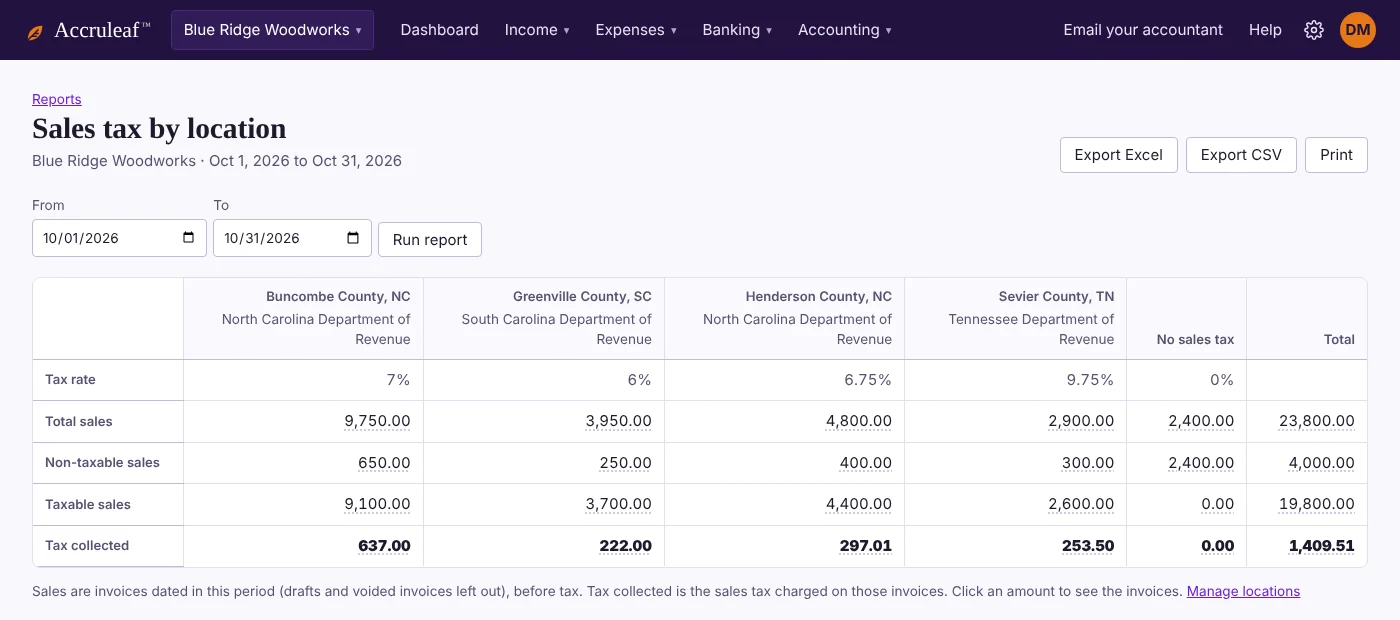
Accruleaf includes combined sales tax rates and tax agencies for every US state, plus thousands of counties and cities. Type an address or ZIP code, and each customer's invoices charge the right rate. At filing time, one report shows what you collected for each location.
30 days free. No credit card to start. Unlimited users.
What you get
- Look up a rate from an address or ZIP code. We find the county or city, its combined rate and the tax agency to pay.
- Each customer gets their location. Their invoices use that rate automatically. Mark individual lines as non-taxable when needed.
- Sales tax by location report. Total sales, taxable and non-taxable sales and tax collected side by side for each location, ready for your returns. Export to Excel or CSV.
- Click through to the invoices. Every amount on the report opens the invoices behind it, so you can check or fix one before you file.
- Rates kept up to date. Rates are reviewed every quarter, when most states and local governments make changes.
- Only if you need it. Service businesses that don't charge sales tax can leave it off, and invoices won't show a tax line.
Questions
Does Accruleaf file my sales tax return?
No. Accruleaf calculates and tracks the tax you charge and gives you a report by location and agency to file with. You or your accountant file the return with each state.
Which states are included?
All 50 states and Washington, DC, with combined state and local rates for thousands of counties and cities.
Can I sell in more than one state?
Yes. Add a location for each place you deliver to that has its own rate, and assign customers to their location.
Can my accountant set it up for me?
Yes. Invite your accountant for free, or use "Ask my accountant" to send them a link straight to the sales tax settings.