
Banking
Bank feeds and reconciliation, without the busywork
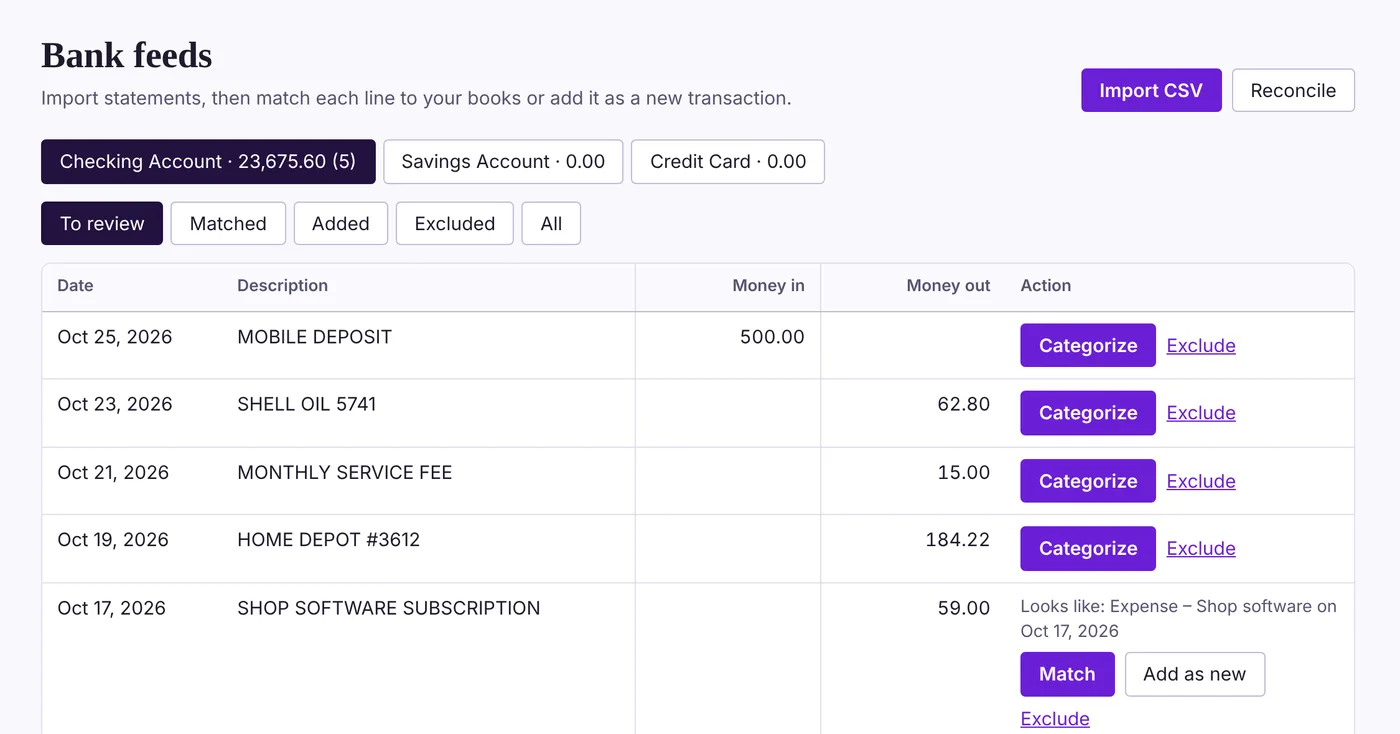
Connect your business bank and credit card accounts once, choose which ones come in, and new transactions arrive every few hours. Accruleaf suggests matches to what you've already entered, and remembers how you categorize each payee.
30 days free. No credit card to start. Unlimited users.
What you get
- Read-only and secure. You sign in to your bank in Plaid's secure window. Accruleaf never sees your bank password and can't move money.
- Only the accounts you choose. Leave personal accounts out, hide accounts you don't use, and start from the beginning of your fiscal year.
- Checks with numbers and payees. Checks show the check number and who was paid, matched to checks you wrote in Accruleaf.
- Deposits apply to invoices. Apply a deposit to one or several open invoices in a click.
- Categorize in bulk. Search and sort, then categorize every charge from the same payee at once.
- Reconcile to your statement. Tick off cleared items and keep a history of every reconciliation.
Questions
Do I need to download an app to connect my bank?
No. Connecting happens in your web browser. Some banks ask you to approve the connection in their own mobile app if you already use it.
What if my bank isn't listed?
Download a statement file from your bank's website (QFX, OFX or CSV) and import it. It works with any bank.
Why is two-step sign-in required?
It protects your bank data even if someone learns your password. You can get the code by email, or use a free authenticator app for the most protection.